trace Command
Table of Contents
- Overview
- TUI Usage
- Use Cases
- Command Format
- Basic Usage
- Implementation Technology
- Performance Impact
- Usage Examples
- Data Processing and Analysis
- Common Issues
- Advanced Tips
- References
- Changelog
- Version History
Overview
The trace command tracks a Python function’s direct callees and execution time, displaying a flat list of aggregated next-level calls below the target function. This is a powerful performance analysis tool that helps developers quickly identify bottlenecks and understand execution hotspots.
Important change in v0.1.20: trace no longer supports a depth option and no longer outputs a recursively nested call tree. The backend captures and aggregates only the target function’s direct callees, making output more stable and overhead more predictable.
TUI Usage
In TUI mode, press 3 key to switch to Trace View, providing the following interactive features:
- Pattern Input: Supports function name auto-completion (fetched in real-time from the target process)
- Parameter Configuration: Visual configuration of min duration, times, condition expressions, skip-builtin
- Active Traces List: The top area shows current trace task status and counts
- Call Tree Visualization: Display each observation’s direct callees as an interactive tree, including aggregated callee nodes
- Detail Stats Panel: Shows timing, counts, percentage, and exception details for the selected observation or callee
- Color-coded Timing:
- 🟢 Green: < 10ms (fast)
- 🟡 Yellow: 10-100ms (medium)
- 🔴 Red: >= 100ms (slow)
- Quick Operations:
- Press Enter after entering pattern to start tracing
- Select a row in the Active Traces list to view that pattern’s call tree
- Select a callee node in the call tree and press
tto start a drill-down trace for that function - Press
cto clear trace records and stop running traces - Press Delete to stop all traces
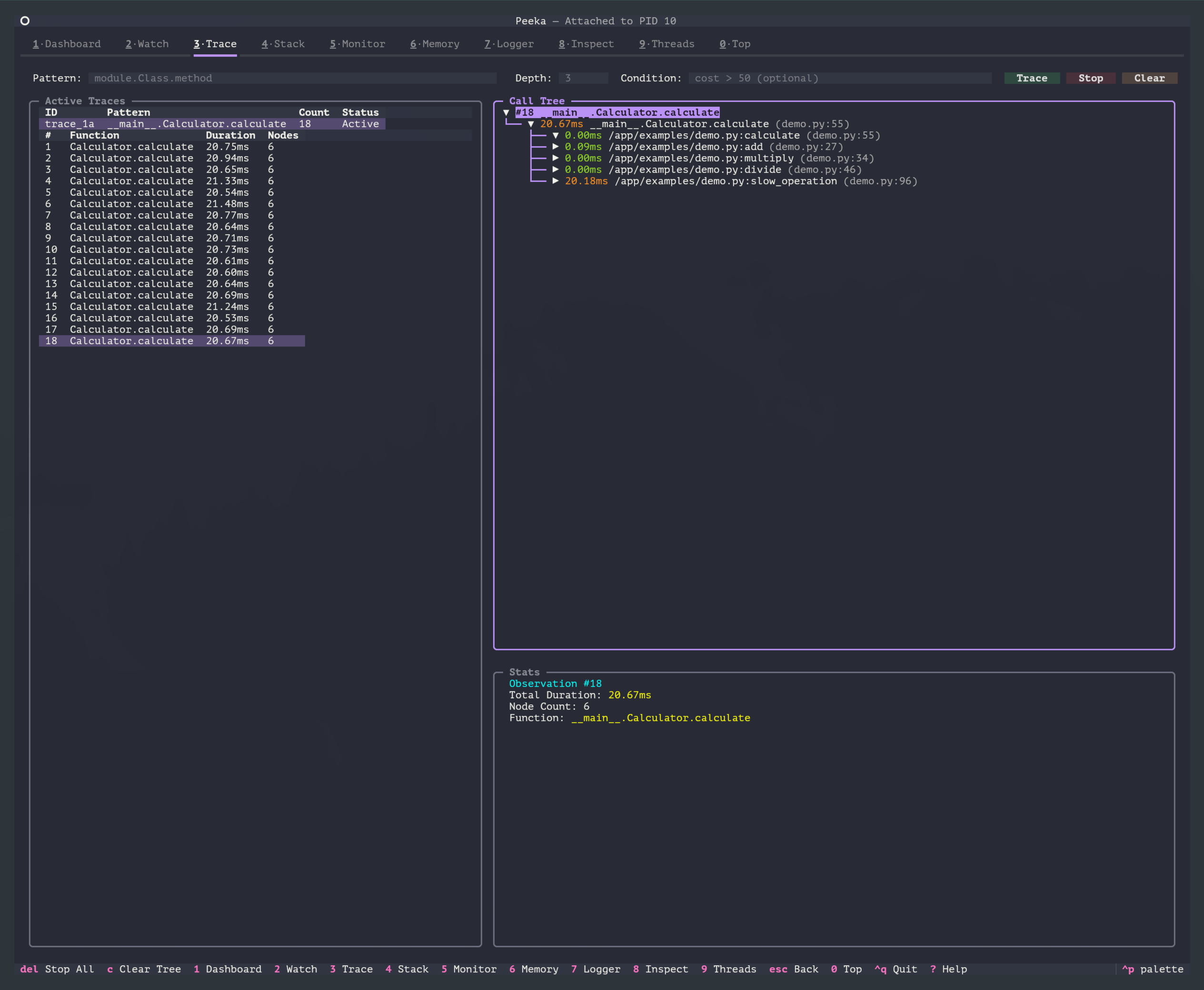
CLI Equivalent Commands: All examples below use CLI commands for demonstration. TUI provides the same functionality with a graphical interface.
Use Cases
- Performance bottleneck identification: Quickly find the slowest child calls below a target function
- Hotspot function identification: Aggregate direct callees by total time, call count, min time, and max time
- Code execution path tracking: Observe which child calls are triggered under different conditions
- Sub-function timing analysis: Analyze the timing share of each direct callee
- Exception call diagnosis: Trace calls that raise exceptions and inspect exception type
Command Format
peeka-cli attach <pid>    # First attach to target process
peeka-cli trace <pattern> [options]
Parameters
| Parameter | Description | Default | Example |
|---|---|---|---|
pattern |
Function matching pattern | - | module.Class.method |
-n, --times |
Observation count (-1 for unlimited) | -1 |
-n 10 |
--condition |
Condition expression (supports cost variable) |
None | --condition "cost > 50" |
--client |
Existing client session ID; auto-creates an ephemeral client when omitted | Auto | --client client_123 |
--skip-builtin |
Skip built-in and stdlib functions | true |
--skip-builtin=false |
--min-duration |
Minimum duration filter (milliseconds); records only direct calls greater than or equal to this value | 0 |
--min-duration 10 |
Notes:
--skip-builtinis enabled by default to reduce output noise- The
costvariable in condition expressions represents total call duration (milliseconds) - The former depth option is no longer supported since v0.1.20
Function Matching Pattern (pattern)
Supports the following formats:
# 1. Module-level function
"mymodule.my_function"

# 2. Class method
"mymodule.MyClass.my_method"

# 3. Nested class method
"mypackage.mymodule.OuterClass.InnerClass.method"

# 4. Module path
"package.subpackage.module.function"
Note: Must use complete module path (from import root). Current version does not support wildcard matching.
Basic Usage
1. Trace Function Direct Callees
# First attach to target process
peeka-cli attach 12345

# Trace 5 calls
peeka-cli trace "calculator.Calculator.calculate" -n 5
Output Example:
{
  "type": "observation",
  "watch_id": "trace_abc123",
  "timestamp": 1705586200.123,
  "func_name": "calculator.Calculator.calculate",
  "location": "AtExit",
  "call_tree": [
    {
      "function": "calculator.Calculator._validate",
      "filename": "/app/calculator.py",
      "lineno": 18,
      "count": 1,
      "total_ms": 2.1,
      "min_ms": 2.1,
      "max_ms": 2.1
    },
    {
      "function": "calculator.Calculator._compute",
      "filename": "/app/calculator.py",
      "lineno": 25,
      "count": 1,
      "total_ms": 98.2,
      "min_ms": 98.2,
      "max_ms": 98.2
    },
    {
      "function": "calculator.Logger.info",
      "filename": "/app/logger.py",
      "lineno": 10,
      "count": 1,
      "total_ms": 15.7,
      "min_ms": 15.7,
      "max_ms": 15.7
    }
  ],
  "total_duration_ms": 125.3,
  "self_time_ms": 9.3,
  "callee_count": 3,
  "node_count": 4,
  "thread_id": 140234567890,
  "thread_name": "MainThread"
}
Field Descriptions:
| Field | Description | Example |
|---|---|---|
watch_id |
Observation ID | "trace_abc123" |
timestamp |
Timestamp | 1705586200.123 |
func_name |
Target function name | "calculator.Calculator.calculate" |
location |
Observation location | "AtExit" |
call_tree |
Direct callee list (flat aggregation) | [...] |
total_duration_ms |
Total execution time (milliseconds) | 125.3 |
self_time_ms |
Target function self time (milliseconds) | 9.3 |
callee_count |
Number of direct callee types | 3 |
node_count |
Total node count (target function + direct callees) | 4 |
thread_id |
Thread ID | 140234567890 |
thread_name |
Thread name | "MainThread" |
exception |
Exception information when raised | "ValueError: ..." |
runtime_meta |
Runtime metadata (backend, gevent, etc.) | {...} |
Call Tree Node Fields:
| Field | Description | Example |
|---|---|---|
function |
Full function name | "module.Class.method" |
filename |
File path | "/app/module.py" |
lineno |
Line number | 42 |
count |
Call count during this observation window | 5 |
total_ms |
Total execution time (milliseconds) | 125.3 |
min_ms |
Minimum duration (milliseconds) | 10.5 |
max_ms |
Maximum duration (milliseconds) | 95.1 |
2. Visual Call Tree (TUI)
In TUI mode, the Trace view uses a top/bottom layout:
Explanation:
- The top Active Traces area shows current trace tasks (Pattern / Status / Count)
- The lower-left Call Tree area shows observation nodes, aggregated callee nodes, and each callee’s timing share for the selected pattern
- The lower-right Stats panel shows details for the selected observation or callee
- Different colors highlight different timing ranges
- Select a callee and press
tto quickly start a new drill-down trace
3. Filter by Min Duration
# Record only direct calls with duration >= 10ms
peeka-cli trace "service.process" --min-duration 10
This reduces noise from high-frequency short helper calls and focuses on child calls that are more likely to consume resources.
4. Conditional Filtering
# Only trace calls exceeding 50ms
peeka-cli trace "api.handler" --condition "cost > 50"

# Combine parameters and timing conditions
peeka-cli trace "service.query" --condition "cost > 100 and params[0] > 1000"
5. Skip Built-in Functions
# Default behavior: skip built-in functions (reduce output noise)
peeka-cli trace "mymodule.func"

# Show all calls (including built-in functions)
peeka-cli trace "mymodule.func" --skip-builtin=false
Built-in Function Examples:
- Python built-in functions:
len(),str(),isinstance(),print() - Standard library functions:
json.dumps(),os.path.join(),datetime.now()
Implementation Technology
Implementation Principles
Peeka’s trace command automatically selects the optimal implementation based on Python version:
| Python Version | Implementation | Performance Overhead | Notes |
|---|---|---|---|
| 3.12+ | sys.monitoring | < 5% | Official PEP 669 API, optimal performance |
| 3.8.1-3.11 | sys.settrace | < 20% | Good compatibility, auto-enabled |
Direct-callee semantics (v0.1.20+): all backends capture only the target function’s direct callees and aggregate identical (function, filename, lineno) calls within the same observation window, outputting count / total_ms / min_ms / max_ms. This avoids the performance uncertainty and data growth caused by recursive/deep call trees.
gevent compatibility (v0.1.15+): when the target has gevent monkey patching or an active hub, trace degrades to the wrapper_only backend to avoid violating frame stack invariants with sys.settrace. This mode still reports target function observations, but it does not provide a direct callee list.
sys.monitoring Implementation (Python 3.12+):
- Based on official monitoring API from PEP 669
- Uses
PY_STARTandPY_RETURNevents to capture calls - Performance overhead < 5%, recommended for production environments
- Automatically allocates tool_id, no conflicts with multiple observations
sys.settrace Implementation (Python 3.8.1-3.11):
- Uses Python’s built-in
sys.settrace()mechanism - Enabled only during target function execution (local trace)
- Performance overhead < 20%, fully usable in most scenarios
skip-builtin Filtering Mechanism:
- Checks
code.co_filename.startswith('<')to filter built-in functions (e.g.,<built-in>) - Checks Python standard library paths to filter stdlib functions
- Enabled by default, reduces output nodes by 50%+
Performance Impact
Performance Overhead
| Scenario | Overhead | Notes |
|---|---|---|
| Simple functions | < 5% | Python 3.12+ |
| Simple functions | < 20% | Python 3.8.1-3.11 |
| High-frequency child calls | 10-30% | Depends on Python version and --min-duration setting |
| High-frequency calls (>1000 QPS) | 20-50% | Recommend limiting observation count |
Explanation:
- Python 3.12+ uses
sys.monitoring, significantly reducing overhead - Since v0.1.20, only one layer of direct callees is traced, making overhead more stable and predictable
- Recommended to use conditional filtering and count limits in production
Performance Optimization Recommendations
- Use minimum duration filtering
# Record only direct calls with duration >= 10ms peeka-cli trace "func" --min-duration 10 - Skip built-in functions
# Enabled by default, reduces nodes by 50%+ peeka-cli trace "func" --skip-builtin - Use conditional filtering
# Only trace slow calls peeka-cli trace "func" --condition "cost > 100" - Limit observation count
# Observe only 10 times
peeka-cli trace "func" -n 10
Usage Examples
1. Identify Performance Bottlenecks
# Trace slow endpoints, find sub-calls with longest duration
peeka-cli trace "api.handler.process_request" --condition "cost > 100"
Output:
[1250ms] api.handler.process_request()
├── [10ms] api.validator.check_params() (count=1)
├── [1200ms] database.query.execute()  ← Bottleneck here! (count=1)
└── [20ms] api.formatter.to_json() (count=1)
Conclusion: Database query consumes 96% of time, needs SQL optimization or index addition.
2. Aggregate High-Frequency Calls
# Trace a function inside a loop and observe repeated child calls
peeka-cli trace "algorithm.process_batch" -n 5
Output Example:
{
  "func_name": "algorithm.process_batch",
  "call_tree": [
    {
      "function": "database.query.fetch",
      "count": 100,
      "total_ms": 850.5,
      "min_ms": 5.1,
      "max_ms": 25.3
    }
  ]
}
Conclusion: process_batch triggered 100 database queries in one execution; consider batch query optimization.
3. Understand Code Execution Path
# Trace conditional branch execution paths
peeka-cli trace "service.business_logic" -n 1
Scenario A (normal flow):
`---[50ms] service.business_logic()
    +---[5ms] service.validate_input()
    +---[30ms] service.process_data()
    `---[10ms] service.save_result()
Scenario B (exception flow):
`---[20ms] service.business_logic()
    +---[5ms] service.validate_input()
    +---[10ms] service.handle_invalid_input()
    `---[3ms] service.log_error()
4. Compare Performance Before/After Optimization
# Before optimization
peeka-cli trace "converter.parse_json" -n 10 > before.jsonl

# After optimization
peeka-cli trace "converter.parse_json" -n 10 > after.jsonl

# Analyze timing changes
jq '.total_duration_ms' before.jsonl | awk '{sum+=$1; count++} END {print "Before:", sum/count, "ms"}'
jq '.total_duration_ms' after.jsonl | awk '{sum+=$1; count++} END {print "After:", sum/count, "ms"}'
5. Integrate into CI/CD
# Performance regression testing
#!/bin/bash
THRESHOLD=100  # Maximum allowed duration 100ms

peeka-cli attach $PID
RESULT=$(peeka-cli trace "critical.function" -n 50 | \
  jq -s 'map(select(.type == "observation")) | map(.total_duration_ms) | add / length')

if (( $(echo "$RESULT > $THRESHOLD" | bc -l) )); then
  echo "Performance regression detected: ${RESULT}ms > ${THRESHOLD}ms"
  exit 1
fi
Data Processing and Analysis
Process JSON with jq
# 1. Extract direct callee list
peeka-cli trace "func" | jq '.call_tree'

# 2. Calculate average duration
peeka-cli trace "func" -n 100 | jq '.total_duration_ms' | \
  awk '{sum+=$1; count++} END {print "avg:", sum/count, "ms"}'

# 3. Find slowest child call
peeka-cli trace "func" | jq '.call_tree | sort_by(.total_ms) | reverse | .[0]'

# 4. Count call frequency (sum by count field)
peeka-cli trace "func" -n 100 | jq -s '[.[] | .call_tree[] | {function, count}] | group_by(.function) | map({function: .[0].function, total_count: map(.count) | add}) | sort_by(.total_count) | reverse'

# 5. Generate flame graph data (using total_ms)
peeka-cli trace "func" -n 1000 | jq -r '.call_tree[] | "\(.function) \(.total_ms)"' > flamegraph.txt
Python Data Analysis
import json
import sys
from collections import defaultdict

# Count total duration and occurrences of direct callees
stats = defaultdict(lambda: {"count": 0, "total_ms": 0})

for line in sys.stdin:
    data = json.loads(line)
    if data["type"] == "observation":
        for callee in data.get("call_tree", []):
            func = callee.get("function")
            if func:
                stats[func]["count"] += callee.get("count", 1)
                stats[func]["total_ms"] += callee.get("total_ms", 0)

# Sort by total duration
sorted_stats = sorted(stats.items(), key=lambda x: x[1]["total_ms"], reverse=True)

print("Top 10 Time-Consuming Direct Callees:")
print(f"{'Function':<60} {'Count':>10} {'Total (ms)':>15} {'Avg (ms)':>12}")
print("-" * 100)

for func, stat in sorted_stats[:10]:
    avg_ms = stat["total_ms"] / stat["count"] if stat["count"] else 0
    print(f"{func:<60} {stat['count']:>10} {stat['total_ms']:>15.2f} {avg_ms:>12.2f}")
Run:
peeka-cli trace "module.func" -n 100 | python analyze_trace.py
Output:
Top 10 Time-Consuming Direct Callees:
Function                                                      Count     Total (ms)      Avg (ms)
----------------------------------------------------------------------------------------------------
database.query.execute                                          100       12500.00       125.00
api.handler.process_request                                     100       15000.00       150.00
json.dumps                                                      500        1000.00         2.00
...
Common Issues
1. Why can’t I see deeper calls?
Problem: The call tree only shows the target function’s direct callees, not callees of callees.
Cause: Since v0.1.20, trace captures and aggregates only direct callees. This provides more stable performance and more predictable output.
Solution:
# If you need to inspect a child call's internals, start a separate trace on that child call
peeka-cli trace "module.sub_module.slow_func" -n 10
2. Too Much Output Data
Problem: Contains many built-in function calls, output difficult to read
Solution:
# Skip built-in functions (enabled by default)
peeka-cli trace "module.func" --skip-builtin

# Record only calls > 10ms
peeka-cli trace "module.func" --min-duration 10

# Use conditional filtering
peeka-cli trace "module.func" --condition "cost > 50"
3. Excessive Performance Overhead
Problem: Application response slows down after enabling trace
Solution:
# 1. Raise the minimum duration threshold to reduce recorded nodes
peeka-cli trace "module.func" --min-duration 10

# 2. Limit observation count
peeka-cli trace "module.func" -n 10

# 3. Use conditional filtering, trace only slow calls
peeka-cli trace "module.func" --condition "cost > 100"

# 4. Consider upgrading to Python 3.12+ for better performance
4. No Data Observed
Possible Causes:
- Function not called
- Function name spelling error
- Condition expression too strict
- Observation count limit reached (-n parameter)
Troubleshooting Steps:
# 1. Confirm function name is correct
python3 -c "import mymodule; print(mymodule.MyClass.my_method)"

# 2. Remove condition expression, observe once first
peeka-cli trace "mymodule.func" -n 1

# 3. Check if process exists
ps aux | grep <pid>
Advanced Tips
1. Generate Flame Graph
# Collect trace data
peeka-cli trace "module.func" -n 1000 > trace.jsonl

# Convert to flame graph format (direct callees folded by total_ms)
jq -r '.call_tree[] | "\(.function);\(.total_ms)"' trace.jsonl \
  > folded.txt

# Generate flame graph (requires flamegraph.pl installation)
flamegraph.pl folded.txt > flamegraph.svg
2. Compare Performance Across Versions
# Version A
git checkout v1.0
peeka-cli trace "module.func" -n 100 > trace_v1.jsonl

# Version B
git checkout v2.0
peeka-cli trace "module.func" -n 100 > trace_v2.jsonl

# Compare average duration
echo "v1.0: $(jq -s 'map(.total_duration_ms) | add / length' trace_v1.jsonl) ms"
echo "v2.0: $(jq -s 'map(.total_duration_ms) | add / length' trace_v2.jsonl) ms"
3. Automated Performance Monitoring
#!/usr/bin/env python3
"""Performance regression monitoring script"""
import json
import subprocess
import time

THRESHOLD = 100  # Maximum allowed duration (ms)
CHECK_INTERVAL = 3600  # Check interval (seconds)

def check_performance(pid, pattern):
    cmd = ["peeka-cli", "trace", pattern, "-n", "50"]
    proc = subprocess.Popen(cmd, stdout=subprocess.PIPE, text=True)

    durations = []
    for line in proc.stdout:
        data = json.loads(line)
        if data["type"] == "observation":
            durations.append(data["total_duration_ms"])

    avg_duration = sum(durations) / len(durations) if durations else 0

    if avg_duration > THRESHOLD:
        send_alert(f"Performance regression: {avg_duration:.2f}ms > {THRESHOLD}ms")

    return avg_duration

def send_alert(message):
    # Send alert (email, Slack, DingTalk, etc.)
    print(f"ALERT: {message}")

if __name__ == "__main__":
    pid = int(sys.argv[1])
    pattern = sys.argv[2]

    while True:
        duration = check_performance(pid, pattern)
        print(f"[{time.strftime('%Y-%m-%d %H:%M:%S')}] Avg duration: {duration:.2f}ms")
        time.sleep(CHECK_INTERVAL)
4. Integrate with Prometheus
from prometheus_client import Histogram, start_http_server
import json
import subprocess

# Define metrics
trace_duration = Histogram('trace_duration_ms', 'Function trace duration', ['function'])

# Start Prometheus server
start_http_server(8000)

# Collect trace data
proc = subprocess.Popen(
    ["peeka-cli", "trace", "module.func"],
    stdout=subprocess.PIPE,
    text=True
)

for line in proc.stdout:
    data = json.loads(line)
    if data["type"] == "observation":
        # Process direct callee list
        for callee in data.get("call_tree", []):
            func = callee.get("function")
            total_ms = callee.get("total_ms", 0)
            if func:
                trace_duration.labels(function=func).observe(total_ms)
References
Changelog
| Version | Date | Updates |
|---|---|---|
| 0.2.0 | 2026-02 | Added trace command documentation |
| 0.1.0 | 2025-01 | Initial release |
Version History
| Version | Release Date | Changes |
|---|---|---|
| 0.1.20 | 2026-07-05 | Removed the depth option; trace now captures and aggregates only the target function’s direct callees, outputs call_tree as a flat list, and adds self_time_ms / callee_count; TUI Trace view now uses a top Active Traces list plus lower call-tree/stats split, with callee drill-down shortcut t and aggregated callee nodes |
| 0.1.18 | 2026-06-24 | CLI --times now counts only observations matching the active stream_id, so concurrent streams no longer count toward the current trace limit; the run wrapper stops the trace stream when the limit is reached |
| 0.1.17 | 2026-06-13 | Trace responses now carry runtime_meta (startup_backend, effective_backend, downgrade_reason) when degraded to the wrapper_only backend; the TUI Trace view surfaces Backend / Gevent state in the stats panel |
| 0.1.16 | 2026-06-07 | Added --client |
| 0.1.15 | 2026-05-27 | gevent patched/active hub runtimes degrade to the wrapper_only trace backend |
| 0.1.12 | 2026-05-08 | Unified TUI panel system, refined responsive layouts (commit 50c4af4) |
| 0.1.11 | 2026-05-07 | Client labeling with stable sources (commit 965ff22), enriched activity diagnostics (commit b1b0412) |
| 0.1.10 | 2026-05-04 | TUI button color normalization (commit fd6a0a1), improved activity log wrapping readability (commit 5f46ae8) |